

TL;DR
Agents fail in production because evals test outputs, not behavior across stateful multi-step workflows.
The failure modes that actually matter: imperfect tool calls, state drift, and no-exit loops that only show up when the agent runs inside a realistic environment.
Software has staging. Agents have nothing between evals and prod. Simulation environments help fill the gap.
SimLab is a self-serve CLI that gives you the full stack: tasks, realistic environments, and deterministic verifiers meaning you find failures before your users do.
The agent passed evals. It worked in the demo. You shipped it. Then it broke.
You’ve probably seen this, or something similar in production. We’ll use customer support as an example. A customer asks for a simple account update. Everything looks good until step 3 of a 12-step workflow.
A tool call fires: the right function name, the wrong schema: the API returns a 422, the agent retries with the same payload, and now you’re in a silent loop. The failure only surfaces when a real user hits it, and it’s nearly impossible to reproduce from logs alone. The failure isn’t just an agent failure, but a support interaction failure, a degraded customer experience.
This isn’t a model problem. It’s a testing problem.

Traditional evals were built for a different problem.
Traditional evals were built for single-turn, input-output tasks. They work for language problems. But this isn’t a typical single output failure. It’s a control loop failure. At each step it reads context, picks a tool or action, executes, observes the result, updates state, and decides what to do next. Step 3 of the workflow isn’t where it breaks, it’s where the compounding mistakes start. Not just for you, but for the customer interacting with your agent.
The bugs that ship to production:
Irregular tool call arguments. Right function, bad payload. Fails schema validation. Retries with the same bad payload.
Silent state drift. Working context diverges from ground truth mid-workflow. Each subsequent step compounds it. By step 8, the agent is making decisions on data it no longer has right.
Incomplete reasoning chains and No-exit loops. Hits a dead end, has no recovery path, retries the same action. No timeout, no fallback, no escalation.
Evals test outputs. They don’t test behavior.
LLM-as-judge makes this worse. You’re using a nondeterministic model to grade a nondeterministic system. The reward signal is noisy, hard to act on, and doesn’t scale to the thousands of rollouts you need to improve the agent.
Your deployment pipeline has a gap.
Software engineers don’t push from local to prod. The pipeline is develop → test → staging → prod. Staging isn’t a perfect replica of production, but it’s close enough for most failures to surface before a user sees them.
The agent development pipeline today: build → evals → prod. No staging equivalent. The first time your agent hits a live API with real latency, a real 200-step workflow, or a user input outside your eval distribution is the first time a real user hits it too.
When something breaks, you’re debugging from logs and likely dealing with an unhappy customer on the other end. You can see your agent failed, but you usually can’t reproduce it, and you can’t run a thousand variations of the failing scenario to understand where the boundary is.
Simulation is the staging layer for agents. It closes the gap between “it passed evals” and “it actually did what we needed it to protect brand integrity and increase customer support satisfaction.”
What a simulation environment actually needs.
Not a bigger dataset. Not a fancier benchmark. It needs…Real. World. Scenarios.
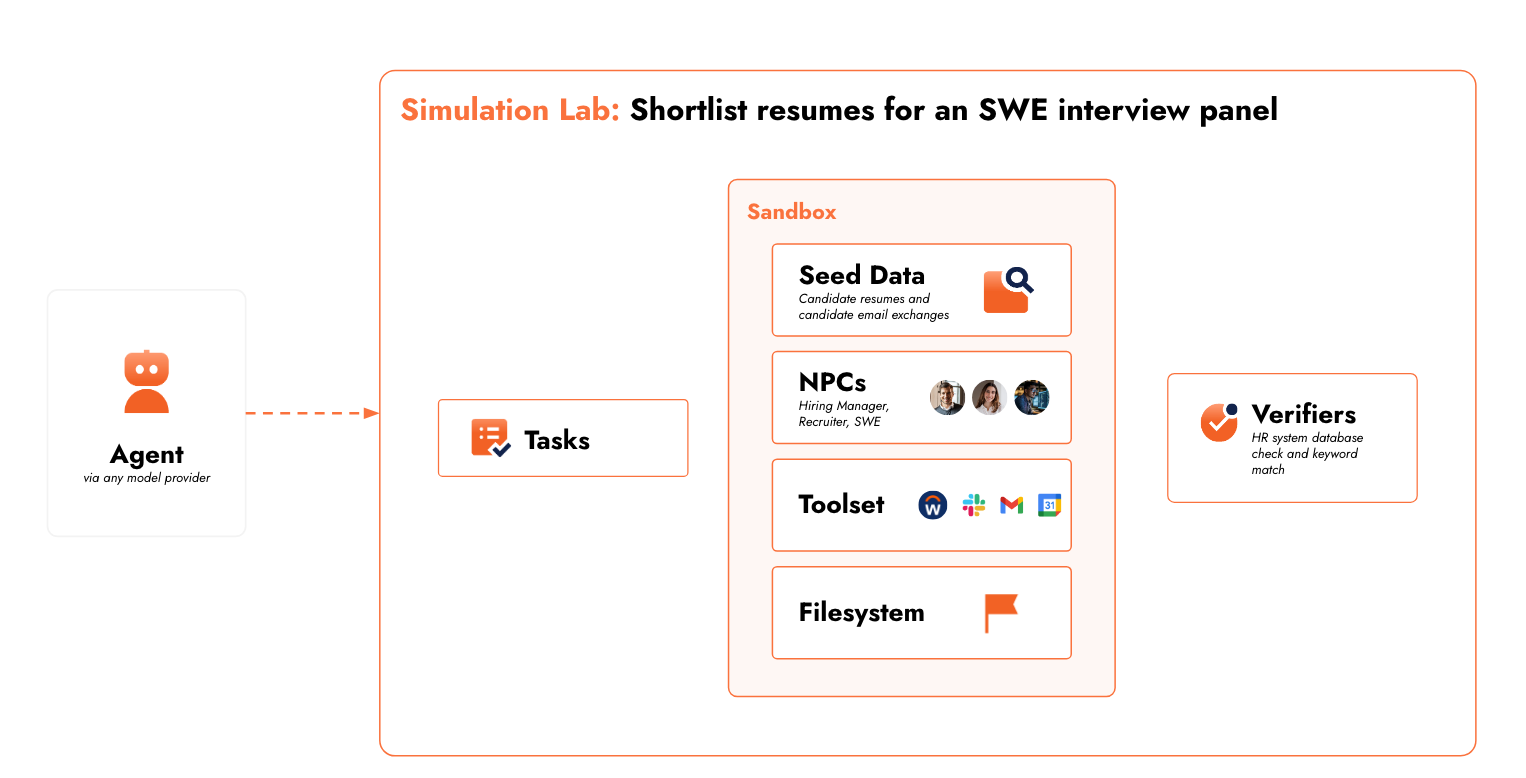
A simulation environment has to let your agent interact with a realistic world across a full task execution trace and give you deterministic and programmatic signal about what happened.
Three things you can’t skip:
Environments. Those that mirror real world scenarios, real customer support interactions. APIs with real failure modes (rate limits, distorted responses, timeouts, unexpected nulls), messy seeded data (incomplete records, conflicting field values, schema mismatches), and NPCs that behave imperfectly, like real users (ambiguous or incomplete requests, assumption breaking points, and task pivots).
Tasks: Long-horizon, multi-step workflows that reflect real production complexity. Tasks that require 50–200 steps, involve ambiguous intermediate states, and have more than one valid execution path. The kind your agent will actually face when someone submits a customer support request.
Verifiers: Deterministic, programmatic checks not LLM-as-judge. Did the agent reach the right end state for the customer? Did it complete all required steps? Did it stay within operational constraints? Consistent signal you can trust across thousands of parallel rollouts.
What your dev loop looks like with simulation.
Instead of: build → ship → debug from logs.
It becomes: build → simulate → fix → simulate → ship.
You run thousands of parallel rollouts across your task distribution and see where failures occur, which steps, which tool interactions, which input types cause breakdowns. When something fails, you get an execution trace you can inspect step-by-step, tweak the environment around, and re-run. You iterate on behavior, tool call logic, error recovery, and context window management in hours, not weeks. And start finding capability gaps you didn’t know to look for.
You stop guessing how your agent behaves. With SimLab, you get to see how it behaves.
We built SimLab to do this.
We kept running into this gap ourselves. Building simulation infrastructure from scratch is a serious investment. The task generation, realistic data, tool simulators, NPC behavior models, sandboxed execution, a deterministic eval layer, and so on. Most teams end up with brittle, domain-specific systems that break the moment the agent or task changes.
SimLab is a self-serve CLI that gives you the full environment stack without live environment risk.
Sandboxed execution. Agents run in isolated containers with full environment control. Arbitrary code execution, configurable tool access, reproducible state. You define what the agent can touch.
Bring your own tools or use pre-built simulators. The platform is self-serve. Connect your own APIs and tool schemas, or use out-of-the-box simulators for common systems like Workday, Salesforce, and others.
Programmatic Task and Verifier generation. Generate long-horizon tasks calibrated to your domain. Tune difficulty, workflow length, ambiguity, and edge case density. High-quality training signal, not clean-room benchmarks.
Programmatic Data: Seeded data and NPC behavior models simulate real production messiness: bad inputs, missing fields, unexpected response formats.
Where this fits in your stack.
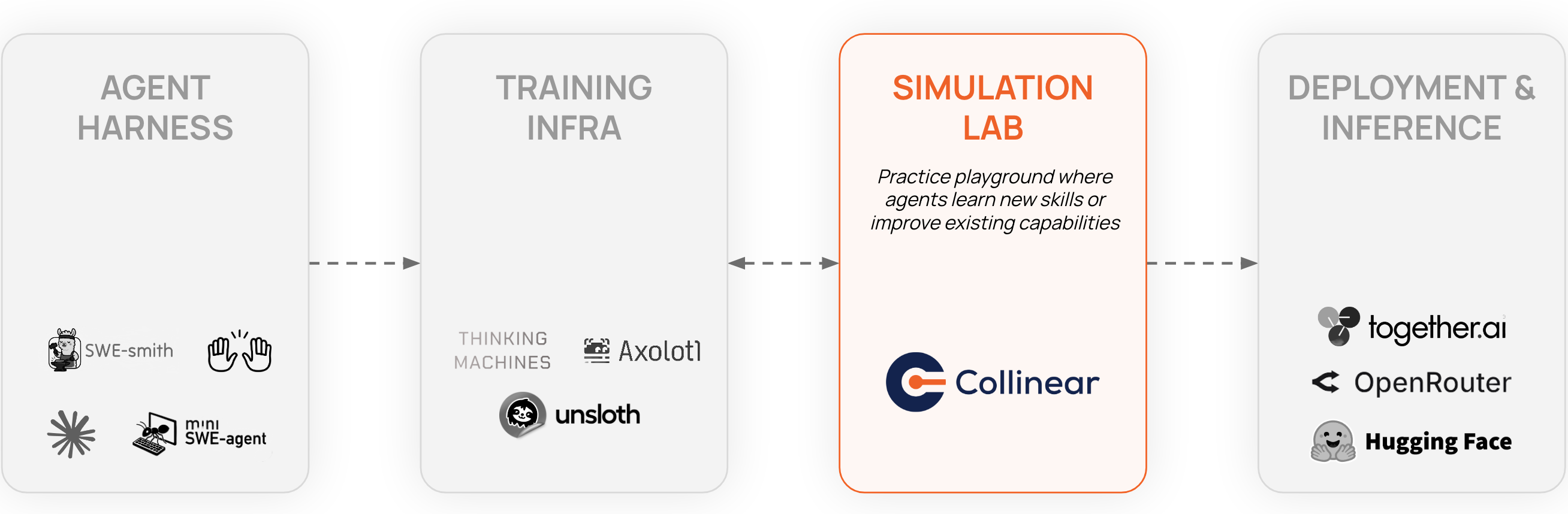
SimLab sits between build and deploy. It’s not a replacement for evals or observability; it’s the layer missing between them.
Evals tell you if individual outputs are correct. SimLab tells you if the agent can complete full workflows under realistic conditions. Observability gives you post-deployment traces of what already broke. SimLab gives you pre-deployment traces of what would have broken.
Human QA pipelines are slow, expensive, and don’t scale. You can also build your own simulation infra, but a full stack covering tasks, environment, verifiers, sandboxing, and parallelization is a significant engineering investment that gets brittle fast.
SimLab is designed to be adaptable as your agents and domains change, without rebuilding from scratch each time.
Simulation is the new deployment.
Simulation will be a standard layer in the agent development pipeline, the same way CI and staging are standard in software. Not just a nice-to-have at scale, but the thing separating agents that demo well from agents that ship reliably.
We’re opening SimLab as a self-serve CLI. Install it, point it at your agent, define an environment, run it. See where it breaks. We’re still testing the task generators, verifier primitives, and environment tooling and we want to know what doesn’t work for your use case.
Try it. See how your agent holds up. Tell us what’s missing.